


When you finish installing the TanaFlows theme, the multilingual feature will not be enabled by default. This is because not everyone uses a multilingual website.

Language switch button after activation
To enable multilingual feature you must have 2 sites:
- Main language site -
https://domain.com - Second language site -
https://domain.com/en/
Configure the two sites as follows:
Main site configuration
Go to Setting > Design > Site-wide and enter the language of the second site in the Other language field. In the case of the demo below the second site is en-https://domain.com/en/

Add ento field Other language
Second language site configuration
Go to Setting > Design > Site-wide , enter:
- Other language : the main language of your site, the demo is
vithe same as the main language of ghostFam - Secondary site : URL of your main site, demo is
https://ghostfam.comwithout the/trailing accent
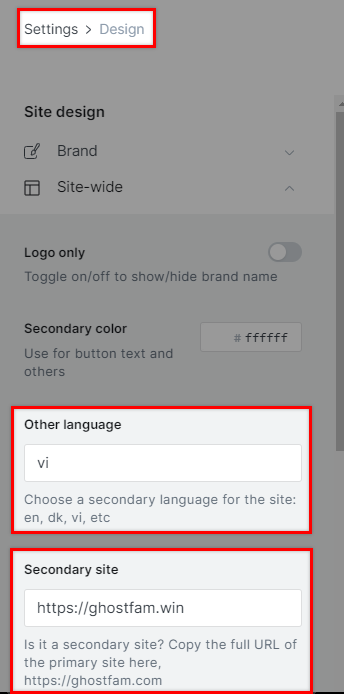
Declare the main site information for the second site
Save and check if the site has a language switch button (refresh browser Ctrl + Shift + R).