

Browser limitation detected

Facebook browser may limit features like the Menu. For the best experience, please tap (...) and choose 'Open in Browser'.

Photo by Thomas Vimare / Unsplash
Privacy Page

Privacy Page

— 1 min read —

Instructions for creating a privacy policy page Privacy.

banner-Cuong Thach
Cuong Thach avatar

Build a lean website to start selling your products immediately. Founder of bePublish and BrainNode OS.

Privacy policy page Privacy is a must-have page when you use ghost in particular because you need it to authenticate your business when creating a Mailgun account to use.

TanaFlows will automatically get the link in the footer when you're done creating.

The footer will receive a Privacy page when you're done creating

How to create a Privacy page for the TanFlows theme

  1. Create a new Page
  2. Set slug as privacy
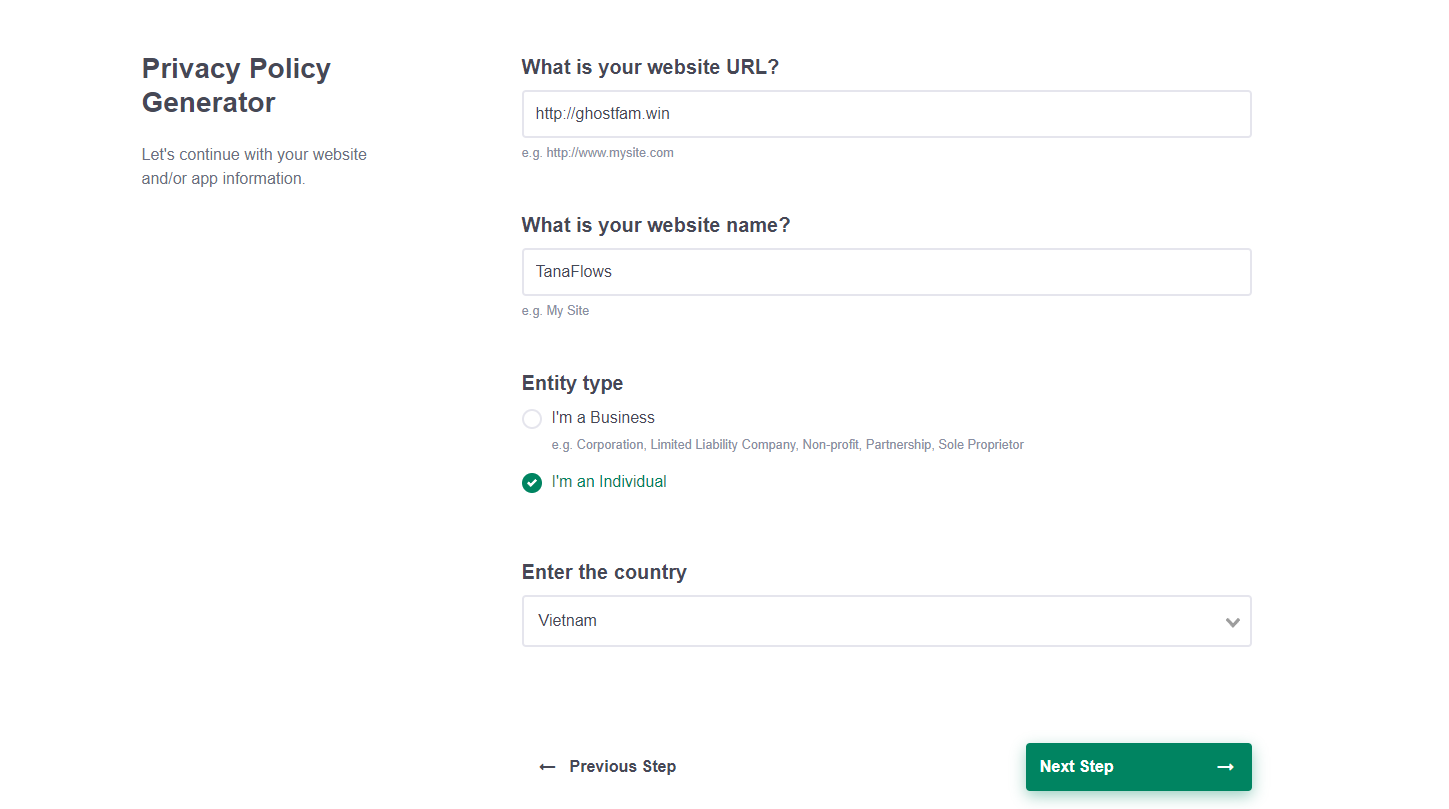
  3. Automatic page content generation

How to create automatic content you go to the following link:

https://app.privacypolicies.com/wizard/privacy-policy

Select Website > Fill in your site information and then click the next button to create it automatically.
We've done.


Comments

banner-Cuong Thach
Cuong Thach avatar

Build a lean website to start selling your products immediately. Founder of bePublish and BrainNode OS.

Join Community TanaFlows

Join TanaFlows community. Make new friends, learn new things, and expand your horizons.